
0x1
这是环境搭建好的页面,无法进入到底层的shell界面
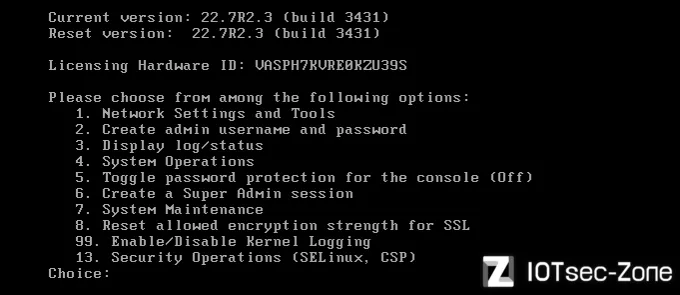
使用vmware将搭建好的系统盘挂载到另外一个虚拟机上
Disk /dev/sda: 100 GiB, 107374182400 bytes, 209715200 sectors
Disk model: VMware Virtual S
Units: sectors of 1 * 512 = 512 bytes
Sector size (logical/physical): 512 bytes / 512 bytes
I/O size (minimum/optimal): 512 bytes / 512 bytes
Disklabel type: gpt
Disk identifier: 7C0CDB37-340D-4226-A8F1-FC9EBAC6D294

Device       Start       End   Sectors  Size Type
/dev/sda1     2048      4095      2048    1M BIOS boot
/dev/sda2     4096   1054719   1050624  513M EFI System
/dev/sda3  1054720 209713151 208658432 99.5G Linux filesystem


Disk /dev/mapper/groupZ-home: 6.72 GiB, 7218397184 bytes, 14098432 sectors
Units: sectors of 1 * 512 = 512 bytes
Sector size (logical/physical): 512 bytes / 512 bytes
I/O size (minimum/optimal): 512 bytes / 512 bytes


Disk /dev/mapper/groupA-home: 4.87 GiB, 5226102784 bytes, 10207232 sectors
Units: sectors of 1 * 512 = 512 bytes
Sector size (logical/physical): 512 bytes / 512 bytes
I/O size (minimum/optimal): 512 bytes / 512 bytes


Disk /dev/mapper/groupA-runtime: 19.46 GiB, 20891828224 bytes, 40804352 sectors
Units: sectors of 1 * 512 = 512 bytes
Sector size (logical/physical): 512 bytes / 512 bytes
I/O size (minimum/optimal): 512 bytes / 512 bytes
这里是挂载出来的所有的磁盘内容,这里直接创建三个目录挂载出来,发现了加密文件就是这三个,只需要对这三个文件进行解密即可
root@eve:~# mount /dev/mapper/groupZ-home /tmp/sda2
mount: /tmp/sda2: unknown filesystem type 'crypto_LUKS'.

root@eve:~# mount /dev/mapper/groupA-home /tmp/sda2
mount: /tmp/sda2: unknown filesystem type 'crypto_LUKS'.

root@eve:~# mount /dev/mapper/groupA-runtime /tmp/sda2
mount: /tmp/sda2: unknown filesystem type 'crypto_LUKS'.
内核启动的时有调用crypto进行加密,其中也有调用api进行解密,那么这个加密与解密的过程就在虚拟机的内存当中,现在只需要对虚拟机的内存文件进行扫描密码即可
   1.boot loader把内核以及initrd文件加载到内存的特定位置。

   2.内核判断initrd的文件格式,如果不是cpio格式,将其作为image-initrd处理。

   3.内核将initrd的内容保存在rootfs下的/initrd.image文件中。

   4.内核将/initrd.image的内容读入/dev/ram0设备中,也就是读入了一个内存盘中。

   5.接着内核以可读写的方式把/dev/ram0设备挂载为原始的根文件系统。

   6..如果/dev/ram0被指定为真正的根文件系统,那么内核跳至最后一步正常启动。

   7.执行initrd上的/linuxrc文件,linuxrc通常是一个脚本文件,负责加载内核访问根文件系统必须的驱动,以及加载根文件系统。

   8./linuxrc执行完毕,常规根文件系统被挂载

   9.如果常规根文件系统存在/initrd目录,那么/dev/ram0将从/移动到/initrd。否则如果/initrd目录不存在,/dev/ram0将被卸载。

   10.在常规根文件系统上进行正常启动过程 ,执行/sbin/init。
这里将sda1,sda2,sda3分别挂载出来其中有grub.cfg,在grub.cfg中进入Current会进入到系统A分区,这里的内容已经告诉我们需要对GroupA组当中的磁盘进行解密,因为GroupZ是恢复工厂设置
....
menuentry "Current" {

set root=(hd0,2) //将GRUB的根文件系统设置为第一块的第二个分区

linux /kernel system=A rootdelay=5 console=ttyS0,115200n8 console=tty0 vm_hv_type=VMware
//采用了A/Z双分区

initrd /coreboot.img //初始内存盘的文件路径
}

menuentry "Factory Reset" {

set root=(hd0,1)

linux /kernel system=Z noconfirm rootdelay=5 console=ttyS0,115200n8 console=tty0 vm_hv_type=VMware

initrd /coreboot.img

}
使用findaes工具对内存文件扫描获取的密钥,这里的密钥就是从系统A分区的内存中得到的
PS C:\Users\admin\Documents\Virtual Machines\ivanti> findaes.exe .\ivanti-ce6dee15.vmem
Searching .\ivanti-ce6dee15.vmem
Found AES-256 key schedule at offset 0xa511916c:
00 01 02 03 04 05 06 07 08 09 0a 0b 0c 0d 0e 0f 10 11 12 13 14 15 16 17 18 19 1a 1b 1c 1d 1e 1f

...

Found AES-256 key schedule at offset 0xf4586070:
f1 a8 aa 2b cc 4f d4 66 53 73 eb 56 81 d7 b7 9e 65 ec 1b 8e bf b9 2f 7d 71 c7 da 8e 80 95 91 72
Found AES-128 key schedule at offset 0xf4c6a040:
e1 fc 5e b7 d8 41 58 da ba d8 eb bc f6 cd 2a 18
构造一个python脚本来对密码进行匹配
import re
import subprocess
import binascii
import os

TARGET_DEVICES = [
    "/dev/mapper/groupA-home",
    "/dev/mapper/groupA-runtime",
    "/dev/mapper/groupZ-home"
]

def parse_keys_from_log(filepath):
    """从 findaes 日志中提取并清洗出有效的唯一 AES 密钥"""
    valid_keys = set()
    hex_pattern = re.compile(r'^([0-9a-f]{2}(?: [0-9a-f]{2})+)$', re.IGNORECASE)

    if not os.path.exists(filepath):
        print(f"[-] 找不到密钥文件: {filepath}")
        return []

    with open(filepath, 'r') as f:
        for line in f:
            line = line.strip()
            if hex_pattern.match(line):
                if '00 01 02 03' not in line:
                    clean_hex = line.replace(' ', '')
                    valid_keys.add(clean_hex)

    return list(valid_keys)

def test_device(device, keys):
    """针对单个设备测试所有密钥"""
    if not os.path.exists(device):
        print(f"[-] 警告: 目标设备 {device} 不存在,跳过。")
        return False

    mapper_name = f"decrypted_{os.path.basename(device)}"
    tmp_key_file = f"/tmp/test_key_{os.path.basename(device)}.bin"

    print(f"\n[*] 开始测试设备: {device} (共 {len(keys)} 个候选密钥)")

    for hex_key in keys:
        try:
            with open(tmp_key_file, 'wb') as f:
                f.write(binascii.unhexlify(hex_key))

            cmd = [
                'cryptsetup', 'luksOpen', device, mapper_name,
                '--master-key-file', tmp_key_file
            ]

            result = subprocess.run(cmd, stdout=subprocess.DEVNULL, stderr=subprocess.DEVNULL)

            if result.returncode == 0:
                print(f"[+] 破解成功! 设备 {device} 的 Master Key 是:")
                print(f"    {hex_key}")
                print(f"[+] 已成功挂载到: /dev/mapper/{mapper_name}")
                os.remove(tmp_key_file)
                return True

        except Exception as e:
            continue

    print(f"[-] 匹配失败: 没有任何提取的密钥可以解密 {device}。")
    if os.path.exists(tmp_key_file):
        os.remove(tmp_key_file)
    return False

def main():
    key_log_file = "keys.txt"

    print("[*] 正在解析内存提取的密钥日志...")
    keys = parse_keys_from_log(key_log_file)

    if not keys:
        print("[-] 未能提取到有效的十六进制密钥,请检查 keys.txt 文件内容。")
        return

    print(f"[*] 成功清洗并提取了 {len(keys)} 个唯一的有效候选密钥。")

    for target in TARGET_DEVICES:
        test_device(target, keys)

if __name__ == "__main__":
    main()
执行脚本后成功把系统A分区的磁盘解密
root@eve:/tmp# python3 1.py

[+] 破解成功! 设备 /dev/mapper/groupA-home 的 Master Key 是:

ef6c94e31dd6093de0d3ab47beeda767a8f66285a4a46f872503462b2ae4a741

[+] 已成功挂载到: /dev/mapper/decrypted_groupA-home

[+] 破解成功! 设备 /dev/mapper/groupA-runtime 的 Master Key 是:
40b15427c2463521f5a972003b66ea905307868a4d72ff02196a31e5e7c0e489

[+] 已成功挂载到: /dev/mapper/decrypted_groupA-runtime
这里解密后将解密后的磁盘进行挂载就可以得到文件系统了
root@eve:/tmp# ls -l /tmp/sda1
total 24
drwxr-xr-x 2 675 511 4096 Oct 5 2024 boot
drwx------ 2 root root 16384 Apr 28 21:43 lost+found
drwxr-xr-x. 25 root root 4096 May 2 01:17 root
root@eve:/tmp# cd sda1/root/
root@eve:/tmp/sda1/root# ls
4.17.00-x86_64 bin boot cgroups conf data dev etc gzip home lib lib64
mnt2 modules pkg proc root run runtime sbin selinux sys tmp usr va
var webserver
拷贝一个支持相同架构的busybox,因为既要有pl脚本输出的内容,也需要后门权限
添加后门(busybox需要权限否则开机时执行不了命令)
system("/sbin/iptables -A INPUT -p tcp --dport 8383 -j ACCEPT");
system("/home/bin/busybox telnetd -l /bin/sh -p 8383");
配置完成后卸载已经挂载的磁盘
umount /dev/mapper/decrypted_groupA-home
umount /dev/mapper/decrypted_groupA-runtime
关闭并锁定 LUKS 加密卷
cryptsetup luksClose decrypted_groupA-home
cryptsetup luksClose decrypted_groupA-runtime
直到输出lsblk命令,所有的挂载、解密层和 LVM 逻辑卷已经完美卸载并彻底分离
root@iotseczone:/dev/mapper# lsblk

......

sda                  8:0    0   100G  0 disk
├─sda1               8:1    0     1M  0 part
├─sda2               8:2    0   513M  0 part /boot/efi
└─sda3               8:3    0  99.5G  0 part /
sdb                  8:16   0    80G  0 disk
├─sdb1               8:17   0   102M  0 part
├─sdb2               8:18   0   102M  0 part
├─sdb3               8:19   0   102M  0 part
├─sdb4               8:20   0     1K  0 part
├─sdb5               8:21   0   6.7G  0 part
│ └─groupZ-home    252:0    0   6.7G  0 lvm
├─sdb6               8:22   0   7.3G  0 part
│ ├─groupA-home    252:1    0   4.9G  0 lvm
│ └─groupA-runtime 252:2    0  19.5G  0 lvm
├─sdb7               8:23   0    17G  0 part
│ └─groupA-runtime 252:2    0  19.5G  0 lvm
├─sdb8               8:24   0   7.3G  0 part
├─sdb9               8:25   0    17G  0 part
├─sdb10              8:26   0   7.3G  0 part
└─sdb11              8:27   0    17G  0 part
发现在启动的时候系统会检查脚本文件的完整性

对关键字的搜索找到了该脚本
root@iotseczone:/tmp/sda1/root# find ./ -name "*.sh" | grep -i "integrity"
./home/bin/check_integrity.sh
check_integrity.sh脚本的流程是:
- 检验清单自身的合法性
- 逐一检验系统文件
如果要绕过检测的话最直接的办法就是将stopOnError=1改为0
sh-4.2# ps -aux | grep "telnetd"
root      4147  0.0  0.0   1248    32 ?        Ss   07:27   0:00 /home/bin/busybox telnetd -l /bin/sh -p 8383
root      4160  0.0  0.0   4516  3020 pts/0    S+   07:28   0:00 grep telnetd
0x2
通过安装vmlinux-to-elf工具将kernel文件从原始内核中恢复出完全可分析的.elf文件
root@iotseczone:/home/iotsec-zone# file ./Tools/qemu-images/powerpc/kernel.bin
./Tools/qemu-images/powerpc/kernel.bin: ELF 64-bit LSB executable, x86-64, version 1 (SYSV), statically linked, BuildID[sha1]=61bc74a13bf25e025ff27033a10f7ae939c4c6f2, not stripped
在kernel文件的populate_rootfs函数中使用了基于 512 字节扇区的变异 CBC-MAC 混合加密模式
  if ( initrd_start )
  {
  // 如果内存中存在 initrd (初始 RAM 磁盘) 的起始物理/虚拟地址
    // 调用内核标准的打印函数
    printk((unsigned int)&unk_FFFFFFFF82055898, v7, v9, v10, v11, v12);

    //记录加密数据的起始地址
    v13 = initrd_start;

    //v14 计算出加密数据的总长度
    v14 = (unsigned int)(initrd_end - initrd_start);
    v19 = crypto_alloc_base((__int64)&aVaes[1], 0, 0);// 返回的 v19 是一个指向 crypto_tfm (Transform) 结构体的指针

    if ( v19 <= 18446744073709547520uLL )
    {

    // 异或还原逻辑
    // 将分散在 .rodata 段的假密钥和硬编码的掩码进行 XOR,拼凑出真实的 16 字节 AES 密钥
    // 结果存放在栈上的 v37 数组中 (v37 是一个 4 个元素的 32-bit 整型数组)
      v37[1] = HIDWORD(DSRAMFS_AES_KEY) ^ 0xAEEF41FE;
      v37[0] = DSRAMFS_AES_KEY ^ 0x99ED2BF2;
      v37[2] = qword_FFFFFFFF81E00168 ^ 0x141058C7;
      v37[3] = HIDWORD(qword_FFFFFFFF81E00168) ^ 0xD2ED180E;

      // v19 + 8 对应的是 crypto_tfm 结构体中的 setkey 函数指针!
      // 翻译为 C 语言即:crypto_cipher_setkey(tfm=v19, key=v37, keylen=16)
      (*(void (__fastcall **)(unsigned __int64, _DWORD *, __int64))(v19 + 8))(v19, v37, 16);
      v20 = 0;
      while ( v14 > 511 )                       // v14大于511 512是一个标准磁盘扇区
      {
        v14 -= 512LL;
        LODWORD(v38) = v20;
        *(_QWORD *)((char *)&v38 + 4) = 0;

        // v21 指向当前要解密的 512 字节数据的内存起始位置
        // v20 << 9 相当于 v20 * 512。v13 是基址。
        v21 = (_DWORD *)(v13 + (unsigned int)(v20 << 9));

        // 提前计算下一个扇区的编号
        v36 = v20 + 1;
        HIDWORD(v38) = 0;
        // v22 是当前扇区的结束指针。因为 v21 是 4 字节的 _DWORD 指针,
        // 所以 128 * 4 = 512 字节。v22 指向扇区末尾。
        v22 = v21 + 128;

        // 【核心】间接调用加密函数 // v19 + 24 对应的是 crypto_tfm 中的 encrypt_one 函数指针。
        // 将刚才构造的 v38 (扇区编号) 作为输入,用 AES 引擎加密,输出结果存入 v39。         // v39 就是这个 512 字节扇区的【全局静态掩码】。
        (*(void (__fastcall **)(unsigned __int64, _DWORD *, __int128 *))(v19 + 24))(v19, v39, &v38);
        do
        {

        // 1. Pre-XOR (前置异或)
        // 将密文的前 16 个字节,与该扇区的【全局静态掩码 v39】进行异或
          *v21 ^= v39[0];
          v21[1] ^= v39[1];
          v21[2] ^= v39[2];
          v21[3] ^= v39[3];

          // 2. 状态保存
          // 将前置异或后的密文原封不动地备份到 v35 (16 字节) 中
          v35 = *(_OWORD *)v21;

          // 3. 原地 AES 解密
          // 再次调用 v19+24 (AES 引擎)。注意传参是 (v19, v21, v21)
          // 意思是将 v21 指向的数据进行 AES 运算,结果再次覆盖写回 v21。
          (*(void (__fastcall **)(unsigned __int64, _DWORD *, _DWORD *))(v19 + 24))(v19, v21, v21);

          // 4. Post-XOR (后置异或 / CBC 链结)
          // 将 AES 输出的结果,与 v38 进行异或。
          // (注意:如果是扇区的第一个块,v38 是 [扇区编号,0,0,0];如果是后续块,v38 是上一个块的 v35 密文备份)
          *v21 ^= v38;
          v21[1] ^= DWORD1(v38);
          v21[2] ^= DWORD2(v38);
          v21[3] ^= HIDWORD(v38);

          // 5. 指针偏移与状态更新
          v21 += 4; // 指针前进 4 个 _DWORD (16 字节),准备处理下一个块
          v38 = v35;
        }
        while ( v22 != v21 ); // 如果还没有走到当前 512 字节扇区的末尾,就继续循环
        v20 = v36; // 扇区处理完毕,更新为下一个扇区编号
      }
通过对代码的分析和全局变量的提取,生成了一个解密脚本来解密加载到initrd当中的coreboot.img文件,这里的脚本作者就不提供了,希望大家可以根据密钥以及代码可以理解到该如何去解密这个coreboot.img,不是很难!
使用脚本将coreboot.img解密
root@iotseczone:/home/iotsec-zone# python3 1.py
[*] 正在装载终极密钥...
[*] 固件总大小: 40962505 字节
[*] 共探测到 80004 个完整 512 字节扇区,准备实施变异解密...
[*] 检测到尾部 457 字节未对齐数据,按照内核逻辑跳过解密直接追加。

[++++++++++ 内核级还原完成! ++++++++++]
[+] 明文已保存至: coreboo_decrypted.img
[+] 嗅探结果: 标准 GZIP,可直接解压!
解压后成功得到文件系统,查找密钥关键字
root@iotseczone:/home/iotsec-zone/_123.extracted/cpio-root# find ./ -name "*key*"
./etc/lvmkey
查看密钥字节数以及使用十六进制查看它的本身
root@iotseczone:/home/iotsec-zone/_123.extracted/cpio-root# wc -c ./etc/lvmkey
16 ./etc/lvmkey
root@iotseczone:/home/iotsec-zone/_123.extracted/cpio-root# hexdump -C ./etc/lvmkey
00000000  6e 1b d1 c3 48 70 bd 72  d2 31 bd 75 53 7e 6c c3  |n...Hp.r.1.uS~l.|
00000010
当这个密钥在内存当中的时候是32字节,这里却是16字节,
根据关键字对/etc/lvmkey进行搜索发现了在lvm-shlib文件当中luksFormat会生成32字节主卷密钥(这里也体现了cbc混合加密模式,它结合了 AES 加密算法、CBC 工作模式、ESSIV 初始化向量生成技术和 SHA256 哈希算法)
- AES:一种对称加密算法
- CBC:分组密码工作模式
- ESSIV:通过扇区的比那好生成IV的方法 IV:是SN被hash经过加密的结果
root@iotseczone:/home/iotsec-zone/_123.extracted/cpio-root# grep -rnw ./ -e "/etc/lvmkey"
./bin/lvm-shlib:118:  echo "y" | $encrypt  -q --cipher aes-cbc-essiv:sha256 --key-file /etc/lvmkey luksFormat ${device}
它会在底层调用Linux内核的/dev/urandom,真随机数生成器抓取32字节的极高熵随机数作为硬盘的终极密码
dd if=/dev/zero of=test.img bs=1M count=10
strace -e trace=openat,open,getrandom cryptsetup -q luksFormat test.img
这里通过对进程的跟踪也可以证实这一点
...
Enter passphrase for test.img:
openat(AT_FDCWD, "/usr/lib/ssl/openssl.cnf", O_RDONLY) = 3
openat(AT_FDCWD, "/dev/urandom", O_RDONLY|O_CLOEXEC) = 3
openat(AT_FDCWD, "/dev/random", O_RDONLY|O_NONBLOCK|O_CLOEXEC) = 4
...
+++ exited with 0 +++
使用密钥解锁尝试一下,并把解密后的文件系统挂载出来也是完整的文件系统
root@iotseczone:/home/iotsec-zone/_123.extracted/cpio-root/etc# cryptsetup luksOpen /dev/mapper/groupA-home pulse_data --key-file /home/iotsec-zone/_123.extracted/cpio-root/etc/lvmkey
root@iotseczone:/home/iotsec-zone/_123.extracted/cpio-root# ls /dev/mapper/
control  groupA-home  groupA-runtime  groupZ-home  pulse_data
root@iotseczone:/home/iotsec-zone/_123.extracted/cpio-root# mount /dev/mapper/pulse_data /tmp/sda/
root@iotseczone:/home/iotsec-zone/_123.extracted/cpio-root# ls /tmp/sda/
boot  lost+found  root
root@iotseczone:/home/iotsec-zone/_123.extracted/cpio-root# ls /tmp/sda/root/
4.17.00-x86_64  bin  boot  cgroups  conf  data  dev  etc  gzip  home  lib  lib64  mnt2  modules  pkg  proc  root  run  runtime  sbin  selinux  sys  tmp  usr  va  var  webserver


